Grok Imagine API
XAI's fast image generator and talking-video model
Six image variations per prompt, and videos whose characters speak the lines you write: xAI's Imagine 1.0 topped the Artificial Analysis video arena at launch.
- Kind: video
- Made by: xAI
- Price: 14.4 credits per video 6 480p, 16.8 7 480p, 19.2 8 480p, 21.6 9 480p, 24 10 480p, 26.4 11 480p, and 69 more (from $0.27; 1 credit = $0.01 on monthly plans, $0.015 as a top-up)
- Released: 2026-02-01
- Open weights: no (Proprietary, API and Grok apps only; no weights published)
- Models on Unicorn: Images (grok-imagine) and Video 1.0
- Images per call: 6 from a text prompt, 2 with references
- Video modes: Text to video or image to video
- Clip length on Unicorn: 6 to 30 seconds
- Video resolution on Unicorn: 480p, 720p or 1080p
- Audio: Always on: speech, music, effects
- Arena at launch: #1 text-to-video and image-to-video (Artificial Analysis)
- Weights: Closed, API only
- Inputs: mode, image, prompt, duration, resolution, aspect_ratio
Call it with POST https://api.unicornapi.net/v1/jobs and model grok-imagine/image-to-video, or try it in the Playground.
Where it shines
- Six image variations from one text prompt
- Videos with speech, music and effects generated in the same pass
- First place in both Artificial Analysis video arenas at API launch
- Text-to-video and image-to-video under one model id, up to 30 seconds
- Video at 480p, 720p or 1080p
Watch out for
- Faces and fine textures can look airbrushed next to Nano Banana Pro
- Reference-image edits often change the background
- Physics and long, busy prompts are inconsistent
- Audio cannot be switched off; closed model with a moderation controversy
Made with Grok Imagine Video 1.0
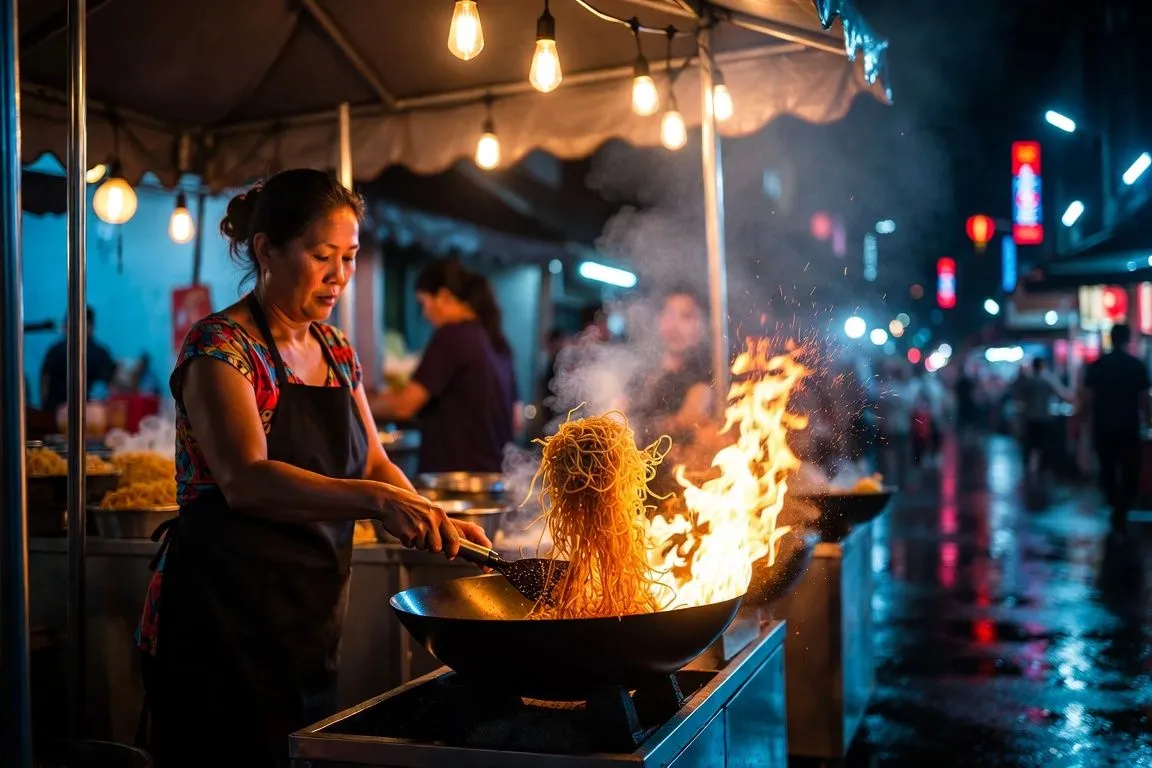
Grok Imagine is xAI's image and video generator, the creative side of the Grok assistant. Type a prompt and it returns a burst of pictures within seconds; pick one, or describe a scene from scratch, and it turns it into a short video with a soundtrack: ambience, music, sound effects and characters who speak the lines you wrote. On Unicorn API the family appears as two models. grok-imagine makes images, six variations per text prompt. grok-imagine/image-to-video, listed as Grok Imagine Video 1.0, makes clips from text or from a start frame.
The reason it matters now is the pairing of quality and speed. When xAI opened the Grok Imagine API at the end of January 2026, the video model went straight to first place in both the text-to-video and image-to-video rankings of the Artificial Analysis Video Arena, ahead of Google's Veo 3.1, Runway Gen-4.5 and Kling 2.5 Turbo. Days later, on 1 February, xAI released Grok Imagine 1.0, which it called its "biggest leap yet": 10-second videos, 720p resolution and, in its words, "dramatically better audio".
It also runs at enormous scale. xAI said Imagine had produced 1.245 billion videos in the 30 days before the 1.0 launch.
From Flux and Aurora to Grok Imagine
Grok first drew pictures in August 2024, using Black Forest Labs' Flux.1. In December 2024 xAI replaced it with Aurora, its own model, which it described as an autoregressive mixture-of-experts network trained to predict the next token from interleaved text and image data. Aurora brought strong photorealism and the ability to edit uploaded images, but it lived inside the chat window as one feature among many.
Video came next. In March 2025 xAI bought Hotshot, a small startup that had trained three video foundation models on some 600 million clips. In the summer of 2025 xAI launched Grok Imagine for Grok subscribers: a dedicated space in the Grok apps that streams image variations as fast as you can scroll and animates any of them into a clip of about six seconds, with sound. Version 0.9 followed on 7 October 2025, with what xAI called "massive upgrades" in visual quality, motion and audio generation, and it was opened to all users across xAI's products.
Version 1.0 is the release that takes Imagine from a feature of the Grok apps to a developer platform, with the API arriving on 28 January and the 1.0 model on 1 February.
Grok Imagine is closed. xAI publishes no weights, no licence for self-hosting, no technical report and no parameter count. It is available in the Grok apps, on grok.com and X, through xAI's API and through resellers such as Unicorn.
What changed in Grok Imagine 1.0
Longer clips. Earlier versions stopped at about six seconds. Version 1.0 makes 10-second videos in the Grok apps, enough for a full line of dialogue or a complete camera move. The API launched with any length from 1 to 15 seconds.
Sharper video. Output moves up to 720p, a visible step up in clarity on large screens.
Much better sound. Audio is generated together with the picture rather than added afterwards. xAI highlights more expressive character voices and background music that fits the scene, and early testers found that lip movement follows the spoken words and that ambient sound matches the setting.
Closer prompt following. xAI and testers both point to better handling of actions, scenes and tone, with smoother motion and fewer jittery artifacts between frames.
A developer API. For the first time the same models can be called from code. xAI's API covers text-to-video, image-to-video and prompt-based video editing, along with the grok-imagine-image model for stills.
Benchmark results. On the Artificial Analysis Video Arena, where voters pick the better of two anonymous clips, Grok Imagine took first place in both text-to-video and image-to-video at launch. xAI also published editing results in which human raters preferred its edits 57% of the time against Kling O1 and 64.1% against Runway Aleph. Video editing is not part of the Unicorn models, but it shows the breadth of the launch.
How Grok Imagine works, as far as xAI says
xAI has not described the architecture, training data or size of the Imagine models. It has said that Aurora, the earlier image model, predicts image tokens autoregressively, but it has not said whether the Imagine image generator is Aurora, a successor to it or a new design, and claims online about its internals contradict one another.
What is documented is how the models behave. The image model returns several variations at once, so you choose rather than reroll. The video model works from text alone or from a start frame, follows the camera and motion described in the prompt, and writes the soundtrack in the same pass. Dialogue written in the prompt is spoken in the clip, and on the route Unicorn uses audio cannot be switched off.
Grok Imagine specs on Unicorn API
| Grok Imagine (images) | Grok Imagine Video 1.0 | |
|---|---|---|
| Unicorn model id | grok-imagine | grok-imagine/image-to-video |
| Modes | Text to image; image to image with up to 5 reference images | Text to video (t2v) or image to video (i2v) |
| Output per request | 6 variations from a text prompt, 2 with reference images | One MP4 with audio |
| Aspect ratios | 1:1, 2:3, 3:2, 16:9, 9:16 | 1:1, 16:9, 9:16, 3:2, 2:3 (a start image sets its own shape) |
| Length | — | 6 to 30 seconds, whole seconds |
| Resolution | No resolution setting | 480p, 720p or 1080p |
| Audio | — | Always on: speech, music, effects |
| Weights | Closed | Closed |
The Unicorn video route goes beyond xAI's launch specs of 10 seconds at 720p in the apps: you can ask for up to 30 seconds and for 1080p.
What Grok Imagine does well
Many good options per prompt. A single request on the image model returns six variations. In a December side-by-side test against Google's Nano Banana Pro, reviewers scored Grok Imagine 89 out of 100 to Nano Banana Pro's 90 for generation, and singled out that its many variations "all remain reliably high quality". For mood boards, thumbnails and concept art, choosing from six frames beats rerolling one.
Colour and cinematic composition. The same test praised Grok's palette, controlled composition and dramatic lighting, with neon reflections and glowing details that give images an emotional punch. It leans towards a polished, film-still look, which suits posters, covers and social images.
Video with a voice. The 1.0 audio is the headline. Write a line of dialogue in quotes and the character speaks it, with lip movement that follows; describe rain, traffic or a crowd and the ambience arrives with the picture. Testers describe the voices as natural and well paced. For short narrative clips, ads and social posts, that removes a separate voice-over and sound-design step.
Camera work. Pans, push-ins, zooms and orbits come out steady, and the model can cut between angles within one clip.
Speed. Imagine is built for fast iteration. Images arrive as a burst of variations within seconds, and short 480p video drafts let you test the camera move, the action and the dialogue several times before you commit to a 720p or 1080p render.
Where Grok Imagine falls short
Less lifelike detail than the best image models. In the Nano Banana Pro comparison, Grok's faces looked "slightly airbrushed" and its backgrounds less believable. Skin texture, fabric weave and other fine materials can read as smooth on close inspection.
Editing that does not hold the scene. With reference images, Grok tends to reinterpret rather than preserve. In the same test it scored 31.5 to Nano Banana Pro's 38 on editing, at times building a whole new setting when asked to keep the background.
Physics and busy prompts. Liquids, cloth and complex interactions can look floaty, and long prompts with many elements sometimes lose details. Complex scenes may take several attempts.
Fixed audio. Every clip comes with sound. That is ideal most of the time, but if you plan to add your own score, you will need to mute the track yourself. Music is the least consistent part of the soundtrack.
Moderation history. Around the turn of the year Grok's image tools were at the centre of a scandal over sexualised edits of real people's photos, leading to temporary blocks in Indonesia and Malaysia, an investigation in California and new restrictions from xAI on editing images of real people. Apps that pass end-user photos to the model should add their own consent and content checks.
Prompting tips and example prompts
Describe the scene the way a cinematographer would: subject, setting, light, lens and mood. Grok rewards specific light ("low amber sun", "neon reflections on wet asphalt") more than adjectives like "beautiful". For images, use the six variations as a contact sheet and keep the prompt the same while you choose.
For an image:
A street-food cook in her forties tossing noodles in a flaming wok at a night market stall, steam and sparks in the air, strings of warm bulbs overhead, rain-slicked street reflecting neon, shot on a 35mm lens, shallow depth of field, cinematic colour grade
For video, describe one main action, one camera move and the sound. Put spoken lines in quotes and say how they are delivered:
A lighthouse keeper in a yellow raincoat stands on the gallery as a storm rolls in, turns to the camera and says firmly, "Storm's turning. We'll have the lamp lit by six." Slow push-in. Sound of howling wind, crashing waves and a distant foghorn.
For animating a still, send it as image with mode set to i2v and describe only what moves:
The cat on the windowsill stretches, yawns and turns to watch a bird outside. Soft afternoon light, camera holds still. Gentle purring and birdsong.
Draft at 480p and six seconds, then render the best take at 720p or 1080p with the length you need.
How Grok Imagine compares with other models on Unicorn
For images. Nano Banana Pro is the stronger choice for lifelike portraits, fine detail and faithful edits. GPT Image 1.5 is the pick for precise instructions and text-heavy layouts. Seedream 4.5 renders at 2K or 4K and is better at posters, small text and keeping a product consistent across edits. The original Nano Banana returns one image per call. Grok Imagine returns six from a text prompt, which makes it the natural pick when you want options and a cinematic look.
For video. Kling 2.6 makes clips with sound and is strong on action and camera movement. Seedance 1.5 Pro also makes clips with audio. Wan 2.6 makes 720p clips from text. Grok Imagine Video 1.0 generates audio with every clip, accepts text or a start frame under one id and runs to 30 seconds. Choose it for dialogue, long takes and fast iteration. For fast action and demanding camera work, try Kling 2.6.
Choosing length, resolution and mode
The video model gives you three dials: duration, resolution and mode. Length runs from 6 to 30 seconds in whole seconds, well beyond the 10 seconds xAI's apps offer, so one clip can hold a full exchange of dialogue or an unbroken camera move. The model can also cut between angles within a clip, so for longer takes say in the prompt whether you want one continuous shot or several angles.
Resolution is 480p, 720p or 1080p. Use 480p to settle the composition, the motion and the spoken line, then render the chosen take at 720p for social posts or 1080p for larger screens. In i2v mode the start image sets the shape of the clip, so crop the still to the aspect ratio you want before you send it; in t2v mode pick from 1:1, 16:9, 9:16, 3:2 or 2:3. On the image model, a text prompt returns six variations and a request with reference images returns two, and n from 1 to 4 runs several generations in one request.
Getting started
Open the Grok Imagine image playground to generate a set of six, or the Grok Imagine Video 1.0 playground to make a clip from text or a start image. To call either model from code, create a key on the API keys page and submit a job to /v1/jobs with the model id and a prompt, plus aspect_ratio for images or mode, image, duration and resolution for video. The API docs cover authentication, polling and webhooks.
Verdict
Grok Imagine 1.0 is xAI's case that image and video generation can be fast and good at once. The video model tops the Artificial Analysis arena, speaks the lines you write and runs on Unicorn for up to 30 seconds at up to 1080p. The image model trades some realism for a cinematic style and returns six variations per prompt. Its limits are real: airbrushed detail, loose edits, shaky physics and a closed, sometimes controversial platform. For storyboards, social clips, talking characters and fast visual exploration, it is one of the easiest models to recommend.
Best for
- Mood boards and concept exploration
- Cinematic stills and social images
- Short clips with dialogue
- Animating a still into a scene with sound
- Fast video drafts and storyboards
Frequently asked questions
Is Grok Imagine open source?
No. xAI offers Grok Imagine only through the Grok apps, grok.com, X and its API, plus resellers such as Unicorn. No weights, self-hosting licence, parameter count or technical report have been published.
How long can Grok Imagine videos be?
On Unicorn API a clip runs from 6 to 30 seconds in whole seconds, at 480p, 720p or 1080p. That goes beyond the 10 seconds at 720p that xAI offers in the Grok apps.
Can Grok Imagine make videos with sound?
Yes. Every clip includes audio generated with the picture: ambience, music, effects and speech. Dialogue written in quotes in the prompt is spoken by the character, and the sound cannot be turned off.
Does Grok Imagine do text-to-video or only image-to-video?
Both. On Unicorn the grok-imagine/image-to-video model takes mode t2v for text alone or mode i2v with a start image, for 6 to 30 seconds at 480p, 720p or 1080p.
Is Grok Imagine better than Nano Banana Pro?
For images, Nano Banana Pro is more lifelike and much better at faithful edits. Grok Imagine is close on overall generation quality (89 to 90 in one December test), more cinematic in style, and returns six variations per text prompt.
Is Grok Imagine the same as Aurora?
Aurora is the image model xAI added to Grok in December 2024. Grok Imagine is the image and video product that followed in 2025; xAI has not said whether its image generator is Aurora, a successor or a new design.